Best QuickBooks Online Apps for Automating Bookkeeping and Reconciliation
Finding the best QuickBooks Online apps for bookkeeping automation isn’t about picking the single “best” tool. It’s about matching the right app to the specific manual task that’s eating your time. Receipt capture, accounts payable, e-commerce reconciliation, and payroll all have different automation needs, and QuickBooks Online’s app marketplace has a genuinely useful (if crowded) option for each one.
This guide breaks down the best QuickBooks Online apps for bookkeeping automation by category, what each one actually solves, and the questions worth asking before you connect one to your books. You can browse the full, official list of options yourself in the QuickBooks App Store, though the sheer number of listed apps is exactly why a category-based approach works better than scrolling through all of them.
What to Look for Before You Connect Any App
Before comparing specific tools, it helps to know what actually separates the best QuickBooks Online apps for bookkeeping automation from ones that create more cleanup work later.
- Does it sync at the transaction level or the summary level? Apps that import each sale, fee, and refund as a separate line give you far more accurate reporting than ones that dump a single daily summary into QuickBooks.
- Does it prevent duplicate entries? If you ever switch tools or run two integrations at once, duplicate transactions are the most common (and most annoying) cleanup problem.
- Can it handle your actual transaction volume? Many apps price by transaction count or order volume, so a tool that’s perfect at 100 orders a month can get expensive fast at 5,000.
- Does it support historical data import? If you’re mid-year or catching up on backlogged books, check how far back the app can pull data before you commit.
- Is it actively maintained? The QuickBooks app marketplace includes tools that are still technically connectable but no longer actively developed. An app that hasn’t been updated in years is a risk, even if it still works today.
Not sure which apps are worth connecting to your books?
We help clients across the US, UK, Canada, Australia, and the GCC choose and set up the right QuickBooks Online automation stack for their business.
Request a Bookkeeping ConsultationReceipt and Bill Capture
These apps eliminate manual data entry by reading receipts, invoices, and bills and pushing the extracted data into QuickBooks.
Dext
Dext uses OCR to extract supplier, amount, tax, and due-date data from photographed or uploaded receipts and bills, then syncs the coded transaction into QuickBooks Online with the source document attached. It’s one of the more actively maintained tools in this category and connects to a wide range of banks and platforms beyond QuickBooks itself, which matters if you also work with an accountant using a different accounting system.
Hubdoc
Hubdoc still technically connects to QuickBooks Online, but it’s owned by Xero, and Xero no longer actively promotes or develops the QuickBooks integration. Its automatic bank and utility statement fetching was also retired in 2022, so it now works on manual upload rather than automatic retrieval. If you’re on Xero already, Hubdoc is worth using; if QuickBooks Online is your primary platform, Dext is the more actively supported choice for the same job.
Accounts Payable Automation
Bill.com
Bill.com automates the bill approval and payment workflow: it captures incoming bills, routes them through custom approval chains, schedules payments, and syncs the whole process back to QuickBooks Online. It’s built for businesses that need multiple people to sign off on payments before money moves, and it scales well as your AP volume grows.
Melio
Melio covers similar ground to Bill.com — paying vendors by bank transfer or card and syncing payments to QuickBooks — with a simpler feature set that suits smaller businesses that don’t need complex, multi-step approval workflows.
Expense Management
Expensify
Expensify’s SmartScan feature reads receipts from a mobile photo and builds expense reports automatically, which syncs into QuickBooks Online for reimbursement and categorization. It also handles mileage tracking and corporate card reconciliation, making it a common fit for businesses with employees submitting their own expenses.
E-Commerce and Payment Processor Reconciliation
This is where the wrong tool choice causes the most reconciliation headaches, since payment processors and sales channels bundle gross sales, fees, taxes, and refunds into net deposits that don’t match your sales reports.
A2X
A2X specializes in reconciling Shopify, Amazon, and Etsy payouts into QuickBooks Online, breaking each payout down into sales, refunds, fees, and taxes so it matches your bank deposit exactly. It’s built specifically for e-commerce sellers and is a strong fit if your main sales channel is one of the platforms it supports.
Synder
Synder connects a wider range of channels and payment processors — including Stripe, Square, PayPal, Shopify, Amazon, and WooCommerce — into one sync, recording each transaction’s product, tax, shipping, discount, and fee detail on its own line. It also includes a built-in reconciliation feature that compares your QuickBooks records against the connected platform’s own reports and flags matched, discrepant, or unmatched entries. This makes it a better fit than a single-platform connector (like the free Stripe Connector by QuickBooks) if you sell across multiple channels and processors and need each one broken out consistently.
Payroll and Time Tracking
Gusto
Gusto handles payroll processing, tax filings, and benefits administration, syncing payroll journal entries into QuickBooks Online so wages, taxes, and deductions post to the right accounts automatically instead of requiring a manual journal entry each pay period.
QuickBooks Time
QuickBooks Time (formerly TSheets) is Intuit’s own GPS-enabled time tracking tool, built to sync directly with QuickBooks Online payroll without a third-party connector in between. It’s a natural fit if you’re already using QuickBooks Online Payroll and want time tracking that doesn’t require extra mapping.
Reporting and Multi-Entity Consolidation
Fathom
Fathom pulls data from QuickBooks Online to build management reports, KPI dashboards, and visual performance summaries that go beyond QuickBooks’ native reporting. It’s aimed at business owners who want a clearer financial picture without building custom reports from scratch each month.
Qvinci
Qvinci consolidates financial data across multiple QuickBooks Online companies in real time, which is useful for franchises, multi-location businesses, or holding companies that need a combined view without manually merging reports from each entity.
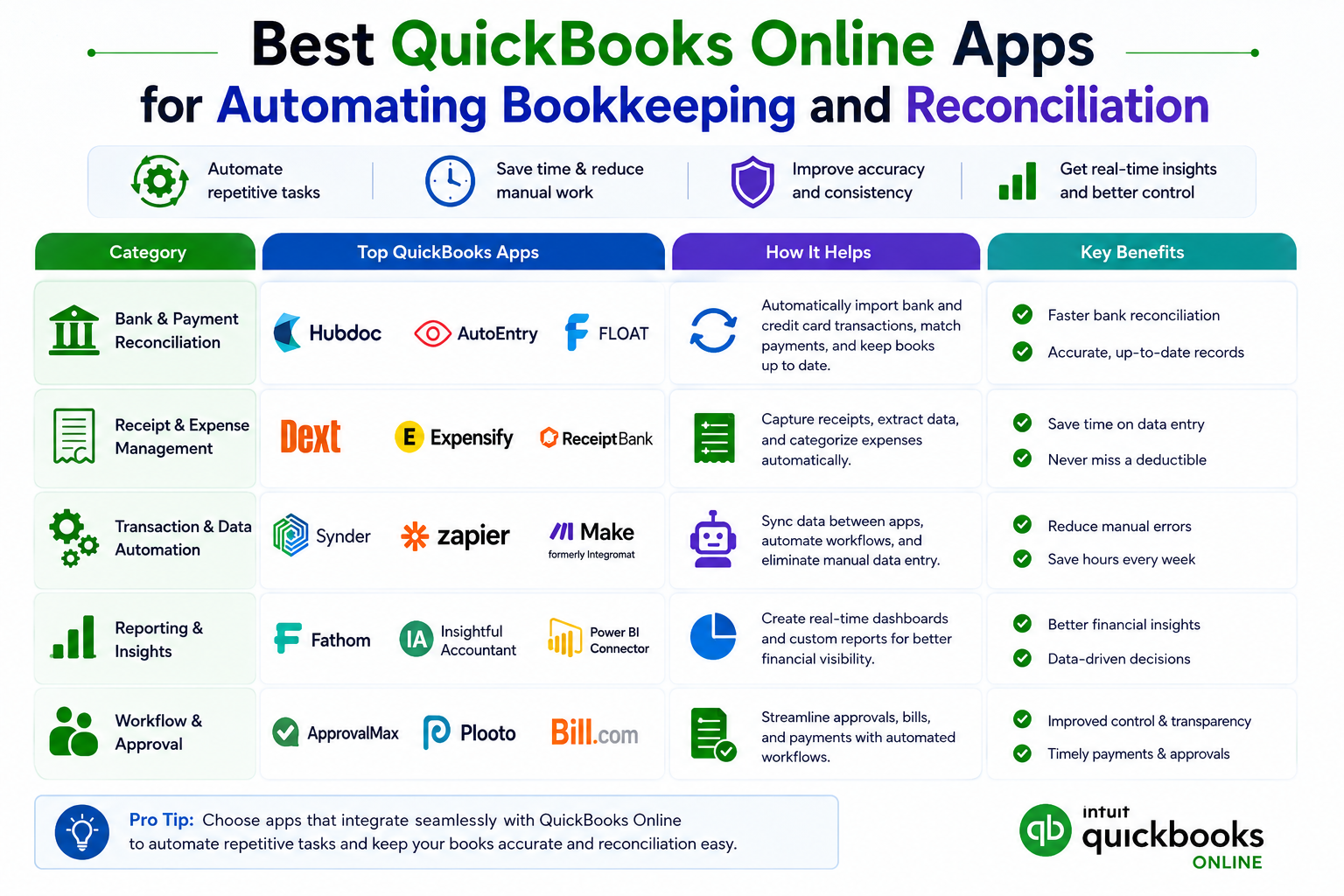
The main categories of QuickBooks Online automation apps, organized by the task they solve.
Comparing the Categories at a Glance
| Category | Examples | Best For |
|---|---|---|
| Receipt & bill capture | Dext, Hubdoc | Eliminating manual receipt and bill entry |
| Accounts payable | Bill.com, Melio | Vendor payments and approval workflows |
| Expense management | Expensify | Employee reimbursements and card reconciliation |
| E-commerce & payment reconciliation | A2X, Synder | Breaking down payouts from Stripe, Square, PayPal, Shopify, Amazon, and Etsy |
| Payroll & time tracking | Gusto, QuickBooks Time | Automated payroll journal entries and GPS time tracking |
| Reporting & consolidation | Fathom, Qvinci | Management dashboards and multi-entity reporting |
Not sure which category actually fits your business?
We’ll review your current workflow and recommend the specific apps worth connecting, and the ones you can skip.
Get a Free ConsultationQuestions to Ask Before You Connect an App
- Does the app import transaction-level detail, or just a daily summary?
- What happens to your data if you cancel the subscription? Can you export your synced history?
- Is pricing based on transaction volume, order count, or a flat monthly fee, and how does that scale as you grow?
- Does it have built-in duplicate protection if you ever run two sync tools during a transition?
- Is the app actively maintained, with recent updates and responsive support?
Common Mistakes When Stacking Automation Apps
Beyond overlapping syncs, businesses commonly run into trouble by connecting more apps than they actually need, skipping the review step on newly synced transactions, and not checking historical import limits before assuming an app will backfill a full year of data. More automation isn’t automatically better if nobody is reviewing what it produces each month.
When Apps Aren’t Enough
Automation apps handle the data entry. They don’t catch a miscategorized transaction, decide how to book a Stripe reserve hold, or know that your sales tax nexus changed last quarter. Apps reduce the manual work of bookkeeping; they don’t replace the judgment behind it.
If you’d rather have someone choose, configure, and manage the right automation stack for your business, GlobalBookkeepingExperts.com works across QuickBooks Online, Xero, and Zoho Books, and helps clients set up and maintain the app connections that actually fit their workflow.
Frequently Asked Questions
What’s the difference between Dext and Hubdoc?
Both extract data from receipts and bills, but Dext is more actively developed for QuickBooks Online specifically. Hubdoc, owned by Xero, still connects to QuickBooks but is no longer actively promoted for that integration, and its automatic document fetching was retired in 2022.
Do I need a separate app if I only take payments through Stripe?
Not necessarily. The free Stripe Connector by QuickBooks covers basic single-channel Stripe syncing. A multi-channel tool like Synder makes more sense once you’re selling through more than one platform or processor.
Can I run Bill.com and Melio at the same time?
You can, but there’s rarely a reason to. Both automate accounts payable, and running both usually just adds complexity without adding capability. Pick the one that matches your approval workflow needs.
Will these apps replace the need for a bookkeeper?
No. These apps reduce manual data entry, but someone still needs to review categorization, catch errors, and make judgment calls the software can’t make on its own.
How many automation apps should a small business realistically run?
It depends on your operations, but most small businesses do well with one app per major category: one for receipt capture, one for payments/e-commerce reconciliation, and one for payroll, rather than stacking multiple tools that do the same job.
Conclusion
The best QuickBooks Online apps for bookkeeping automation aren’t the ones with the most features. They’re the ones that solve your specific manual bottleneck without creating duplicate work or reconciliation gaps. Start with the category causing you the most pain each month, evaluate one or two options against the criteria above, and add automation gradually rather than all at once.
Let us build your automation stack for you
From app selection through setup and ongoing reconciliation, GlobalBookkeepingExperts.com keeps your QuickBooks Online books clean and automated.
Talk to a Bookkeeping Specialist